
For health seekers
Engage with doctors you trust. Stay connected beyond the visit.

Today, you see a doctor, get advice, and the relationship disappears until the next problem. Liferil keeps it going, with your records and reminders alongside.
Why Liferil
Health care should not end when the visit does.
Many people do not know whom to trust, and lose touch with the doctors who helped them. Liferil changes both.
Know whom to trust
Every doctor has a profile with their qualifications, experience and medical registration number.
Stay connected after the visit
Add a doctor as a Healthmate and the relationship carries on beyond the consultation room.
Learn from doctors
Read what doctors share in Health Studio and take part in health communities.
Keep your health in order
Your reports, prescriptions and reminders sit alongside the people who help you.
Features and how to use them
What you get, and how to use it.
Healthmate
Keep the doctors and people you trust close.
How to use it
Health Studio
Learn from the doctors you follow.
How to use it
Video Consult
Face-to-face care when a clinic visit is not possible.
How to use it
Health Passport (coming soon)
All your health documents, kept together and explained.
How to use it
Health Planner
A calendar for your care, not just your habits.
How to use it
2nd Opinion
Another doctor’s view before a big decision.
How to use it
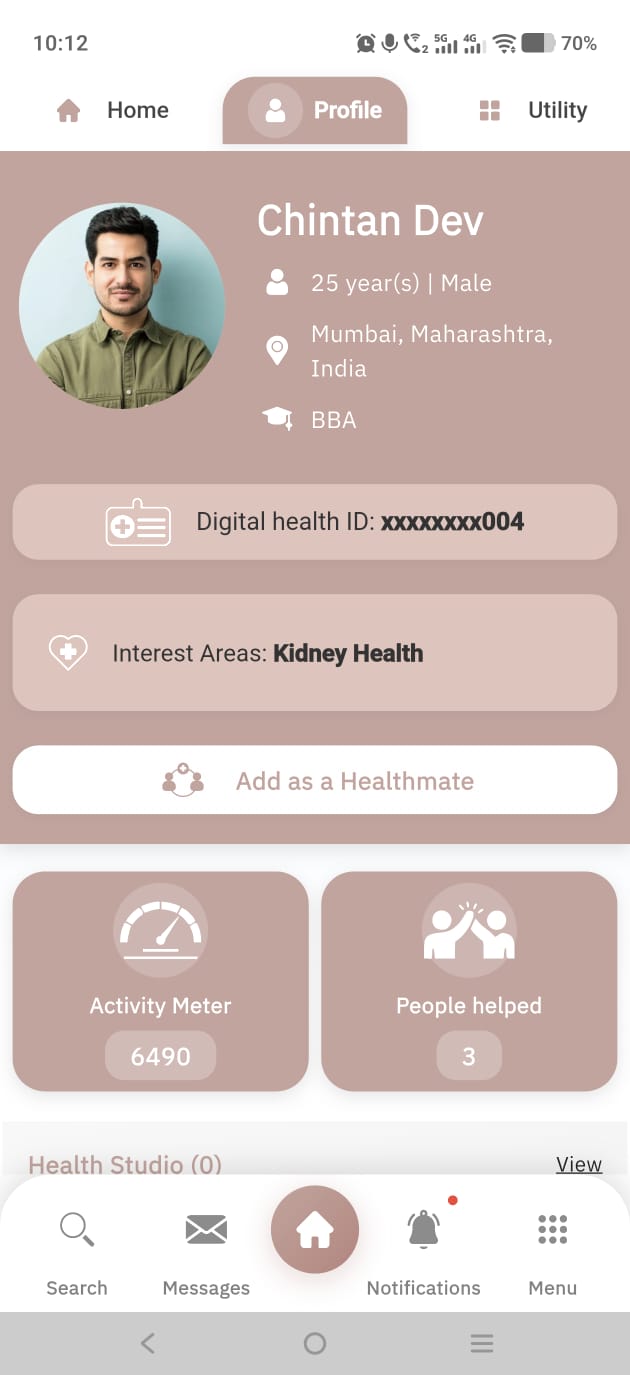
In the app
Your own profile in the network.
You are not just a patient on someone else's list. You have a profile of your own.
Digital health ID
Your own ID for health, shown on your profile.
Interest areas
Tell people which health topics you care about.
Activity Meter
A running measure of how active you are on Liferil.
People helped
A count of the people you have helped.
Add as a Healthmate
Connect with doctors and people you trust.
Also inside
Health Communities
Learn and share with people who care about health.
Health Guards
Bring trusted people into your health journey.
Start your health journey with Liferil.
Download Liferil, get a guidance on your health topics from health experts. The rest builds from there.