
For doctors
Your professional identity shouldn't be confined within walls of your hospital.

Build it. Own it. Grow it.
Liferil gives you a place to be known, followed and trusted, and a way to stay connected with patients beyond the consultation room.
Why Liferil
Your name should travel with you.
Doctors lose touch with patients after the visit and have little space to build a name beyond the hospital or clinic where they work. Liferil gives you that space.
A profile that is yours
Your name, degrees, experience and registration number stay with you, whichever hospital or clinic you work at.
Be known, followed and trusted
A complete profile and a short video introduction help people trust you before they meet you.
Stay connected beyond the consultation
People add you as a Healthmate, so the relationship carries on after the visit.
Share what you know
Health content goes out under your own name, ready to share on WhatsApp.
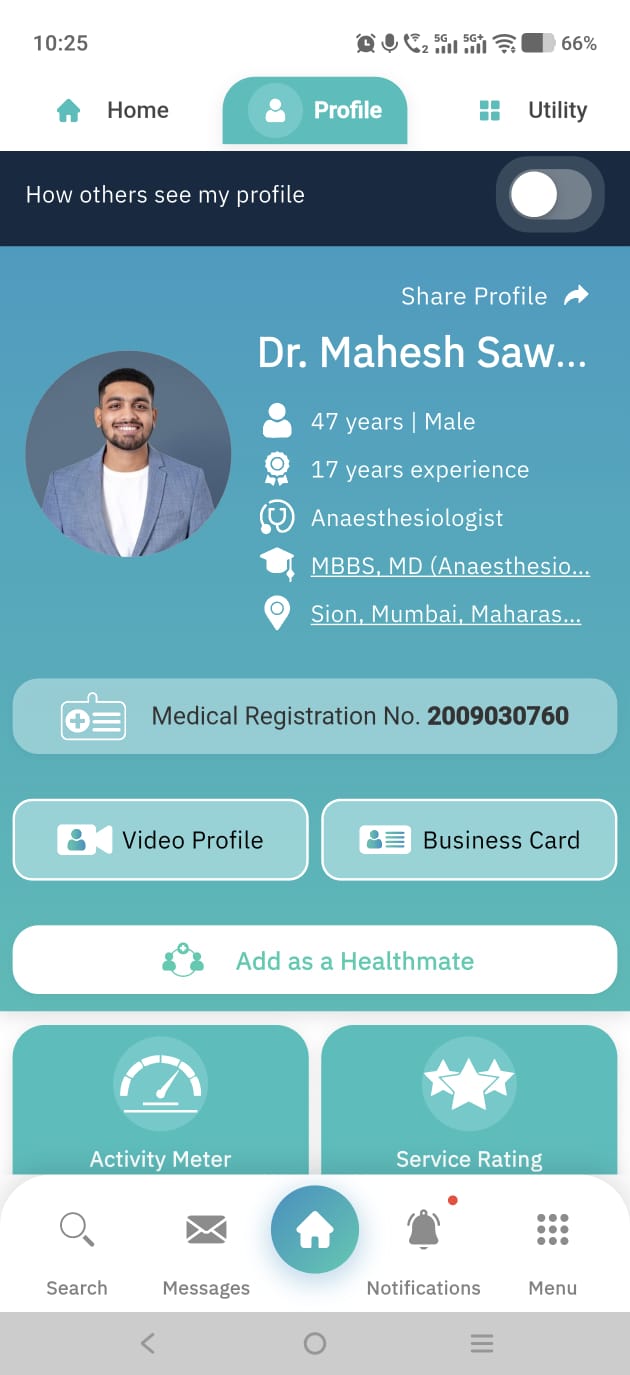
In the app
A profile built to earn trust.
Everything a patient, healthseekers or colleague wants to know about you, in one place you control.
Your credentials at a glance
Photo, experience, specialty, degrees and practice location.
Your achievements in spotlight
Flaunt your awards, publications & certifications so people can see who you are.
Video Profile and Business Card
Two buttons that introduce you and let people carry your details.
Share Profile
Send your profile to anyone in one tap, viewers need not download any app.
Activity meter & Service ratings
Your activity and people engagement indicator on Liferil, visible to all.
Add as a Healthmate
How people connect with you and stay connected. Invite your patients, colleagues to join liferil
Features and how to use them
Six tools for being known, followed and trusted.
Doctor Profile
A professional profile that stays yours when you change hospitals.
How to use it
Video Profile
Let patients and peers meet you before they walk in.
How to use it
Business Card
A digital card with your name, degree and specialty.
How to use it
Healthmate
Stay connected with patients and colleagues.
How to use it
Awards/Certifications
Ready-made patient infographics that carry your name.
How to use it
Question Wall
See patients on video from your own phone.
How to use it
Get started
Your profile in three steps.
1
Log in or download
Sign up on the web or get the app for Android or iPhone.
2
Build your profile
Add your photo, degrees, specialty, registration number and a short video introduction.
3
Share it
Send your profile link or digital card to patients and colleagues.
Start building your digital home today.
Create your profile on the web or download the app and carry your professional identity in your pocket.